Security
Here is an explanation of why the Asfaload approach provides security while still being easy to use. This is security focused, and is not a user guide. If you’re interested in how to use Asfaload, go to the Getting Started guide.
Asfaload supports multiple publishing platforms (Github, https file servers, …) but this documentation will focus on securing the download of Github releases artifacts.
Requirements
Asfaload is developed with one main idea: the main requirement for the solution to be sound security-wise is that the publishing account is not compromised at the time it is registered with Asfaload.
Asfaload being a multi-signature solution, the more signatures you require, the more you increase the difficulty for an attacker to compromise your publication process. That’s why we encourage to require at least 2 secret keys provide their signature in your Asfaload multisignature definition, and to keep those 2 secret keys on 2 distinct devices.
Work is ongoing to ensure the solution provided by Asfaload is not compromised if our backend is compromised. But as self-hosting the Asfaload backend is easy, you don’t have to trust us for that either. If you cannot rely on a third-party backend, you can deploy your own.
The second requirement to provide a sound solution is that the multi-signature configuration published at registration time (when the registered account is required to be uncompromised) needs to stay available at the same location. This is our trust anchor, ensuring all activity registered by Asfaload for this account is legit.
Project registration
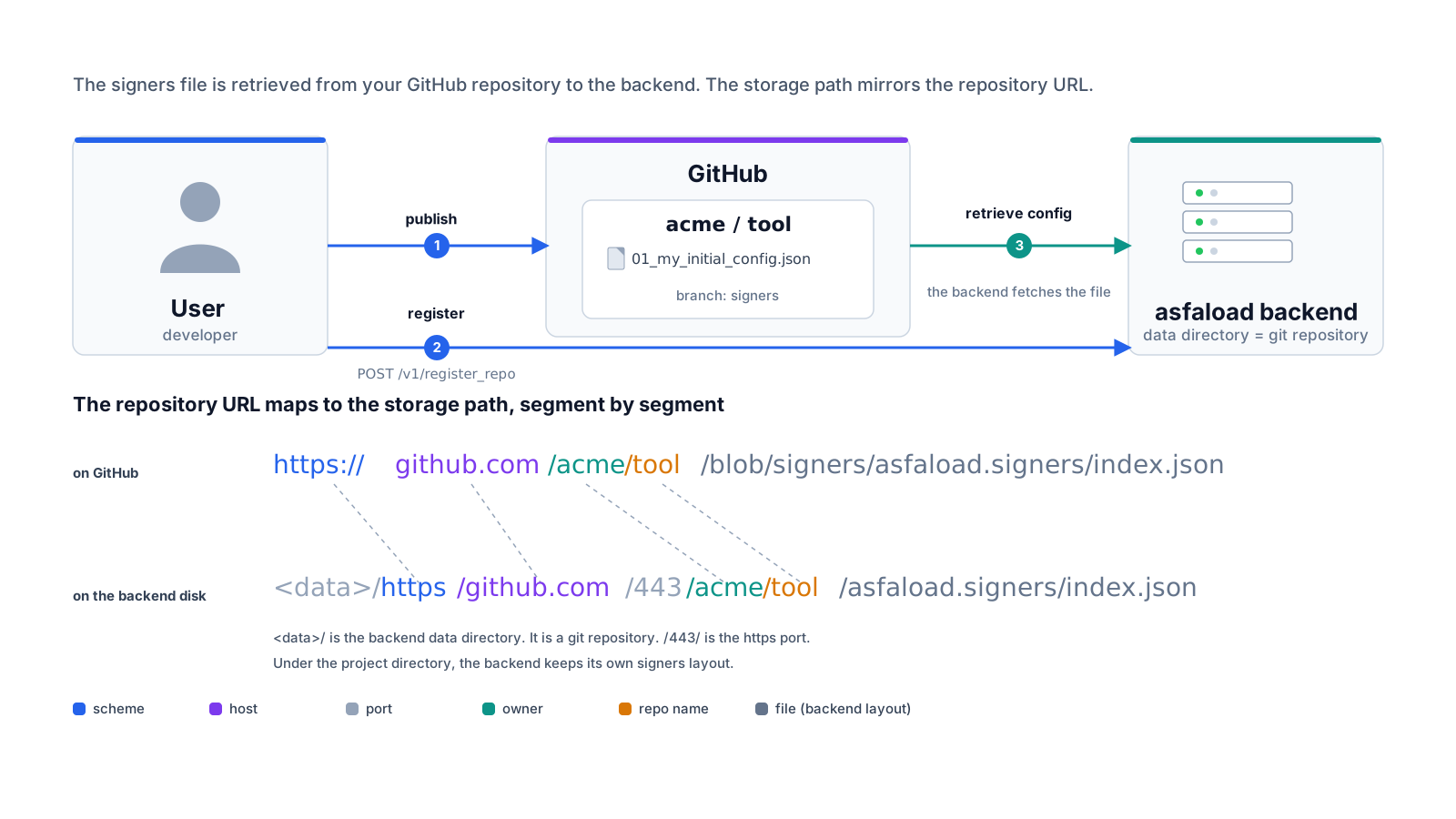
When registering a project with Asfaload, you publish a multi-signature definition on your publishing account, in our example a Github repository.
If you register a git repository, we encourage you to create a dedicated branch for publishing the initial multi-signature definition and the possible updates.
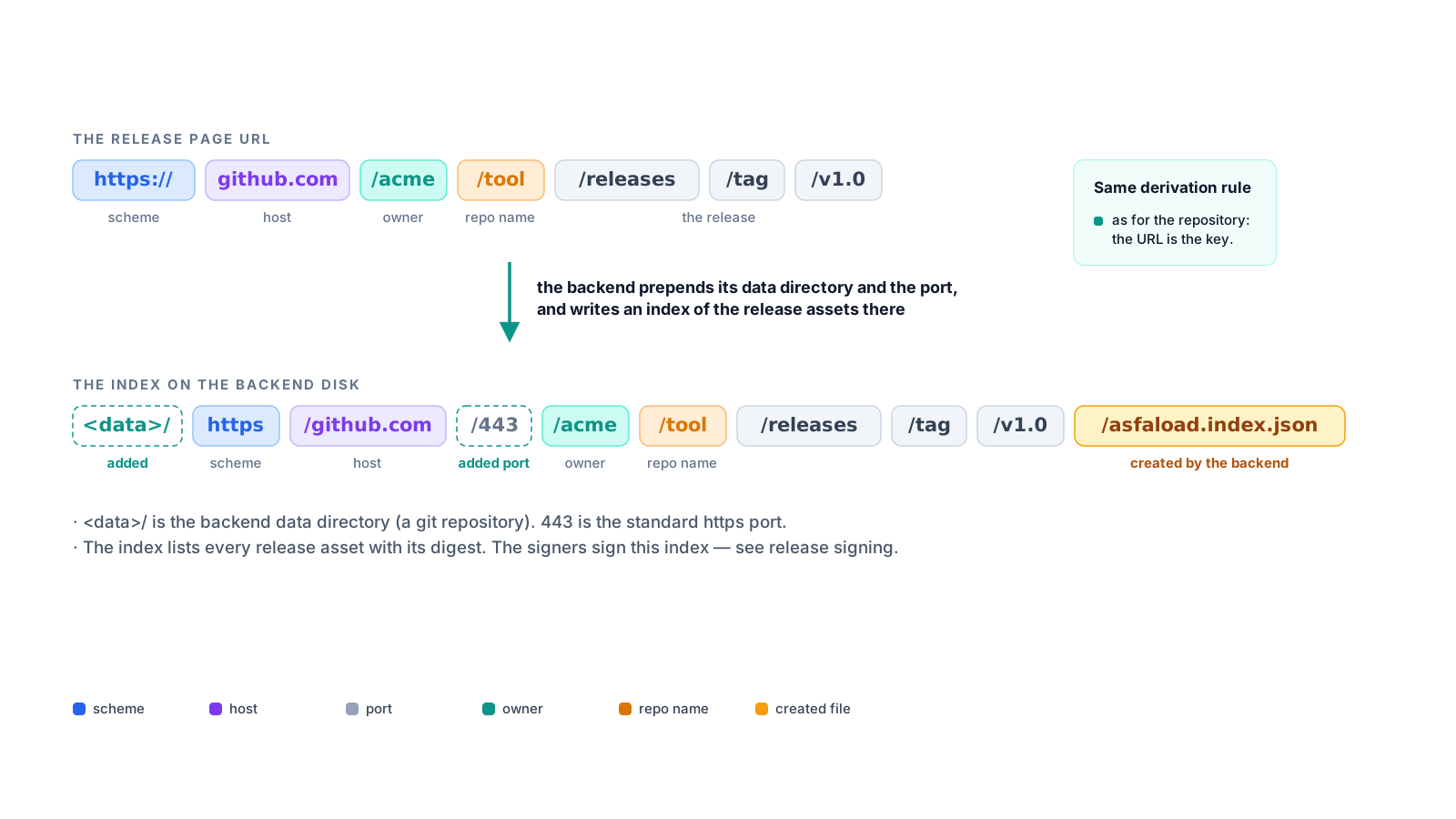
When registering this Github repository, the Asfaload backend will copy and store the multisignature definition at a path specific to the github repository.
For example, when registering the repository https://github.com/acme/tool, it
will store all data related to the repository under the path
https/github.com/443/acme/tool. That is what ties the data on the
backend to the repository it applies to.
The path to the signers file on the backend is in our case https/github.com/443/acme/tool/asfaload.signers.pending/index.json.
Some metadata is also registered, such as the location from which the config was retrieved. This is needed as we do not impose a convention of a branch name where to store the multi-signature configs. The metadata is also signed as its authenticity is required (See download below, at the step verifying the authenticity of the genesis config).
Once registered, the multisignature is still in pending state, as can be seen in its path name. It now needs to be activated.
Configuration activation
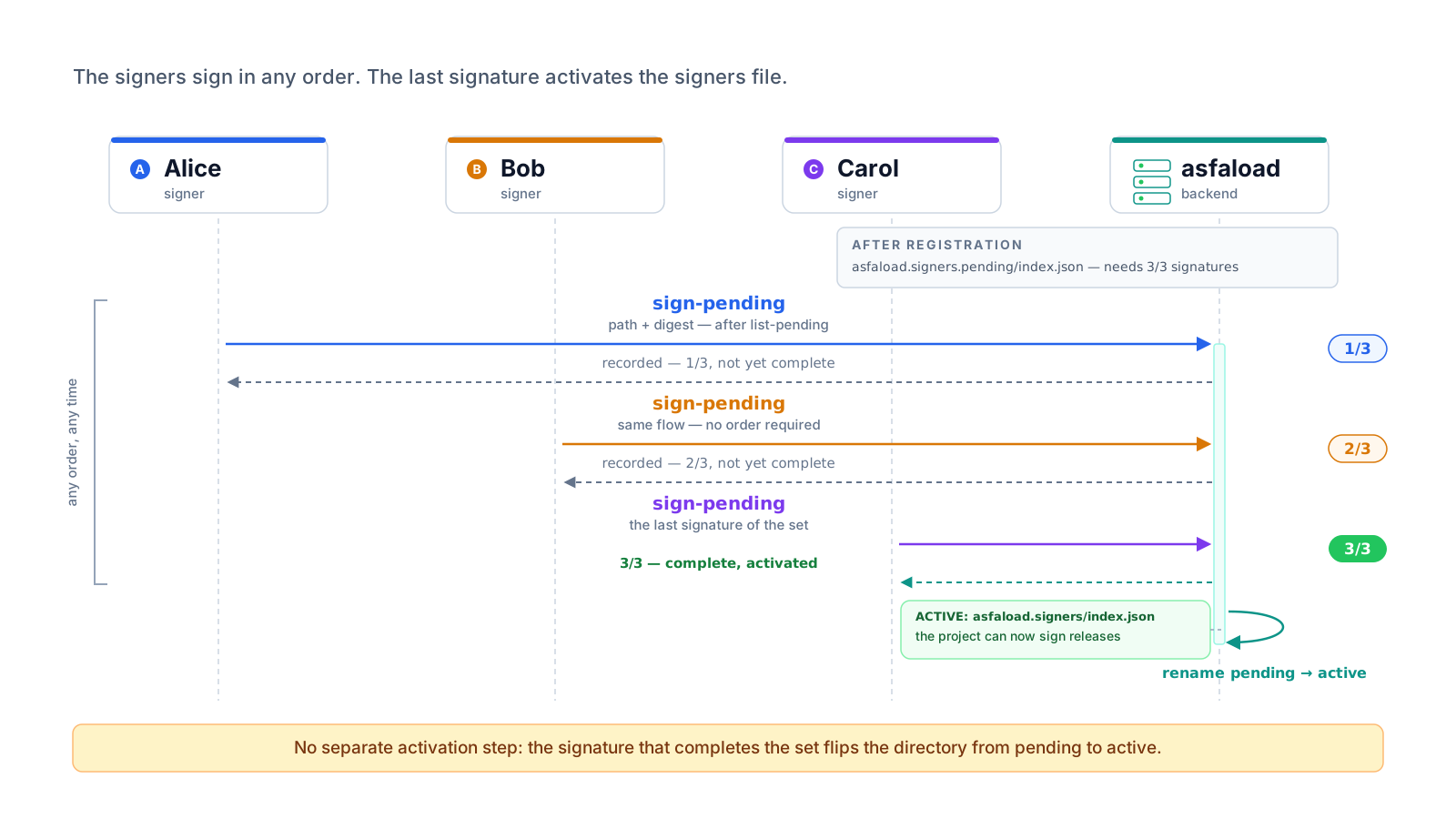
When the project is registered on the backend, it still has to be activated. To that end, all signers mentioned in the config have to sign it. This ensures that all keypairs referenced are controlled and can provide a signature.
Not only the configuration is signed, but also its metadata containing its retrieval url. Before signing, the document at the retrieval url is compared to the configuration returned by the backend and only if those match will the client send a signature of both the config and its metadata to the backend.
The signatures of a file are collected in a sibling file named identically but with the suffix .signatures.json.pending appended.
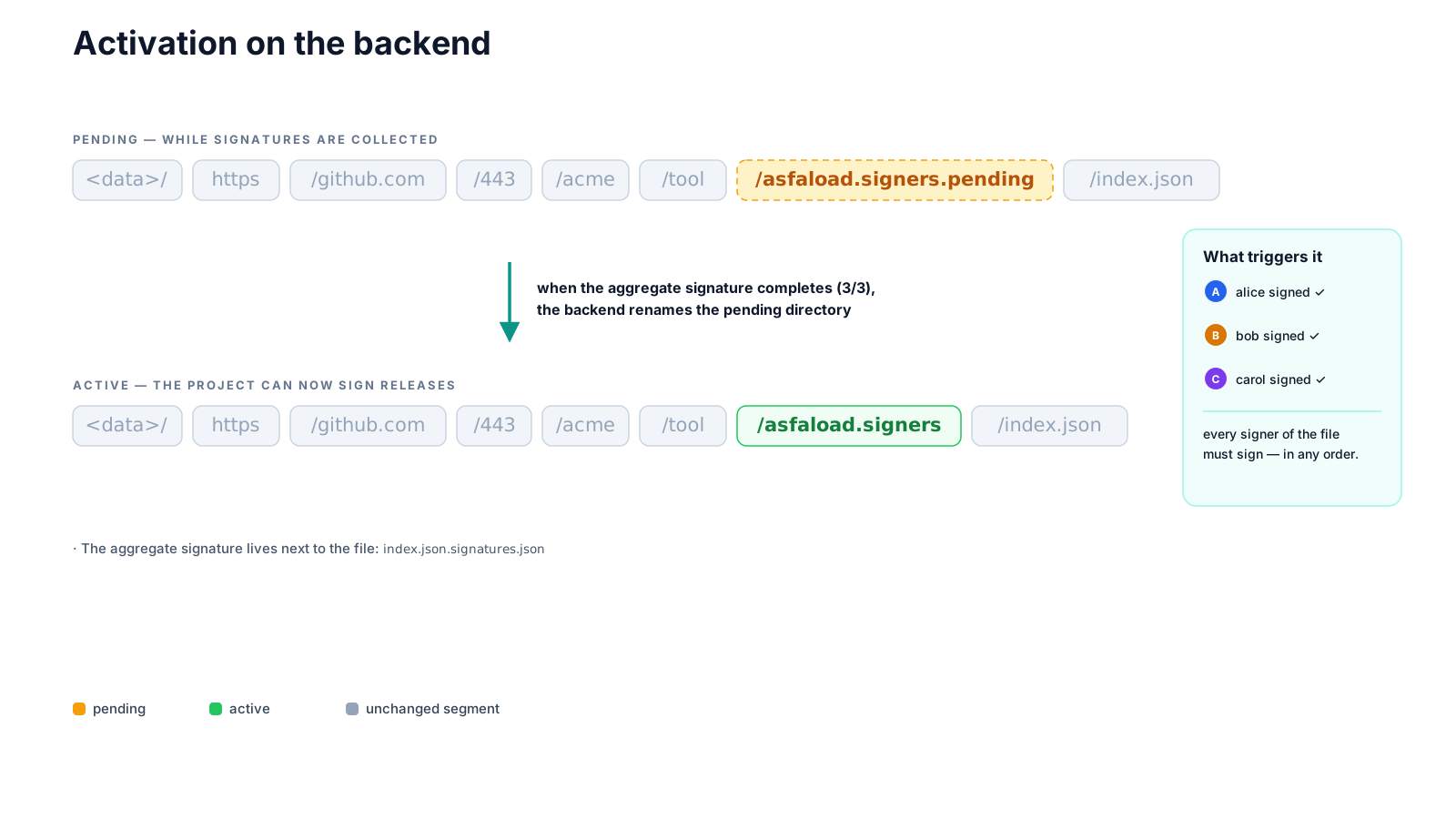
Once all keypairs have signed, the signature file is renamed to drop the
pending marker, and the same is done with the asfaload.signers.pending
directory. At that time the configuration is activated: the multisignature configuration is available at its well-known location, and its
signature can be verified.
It can now be used to sign artifacts published in a Github release of this repo.
Release registration
A new release published by the Github repository needs to be registered on the backend (possibly automatically) for signature collection to begin.
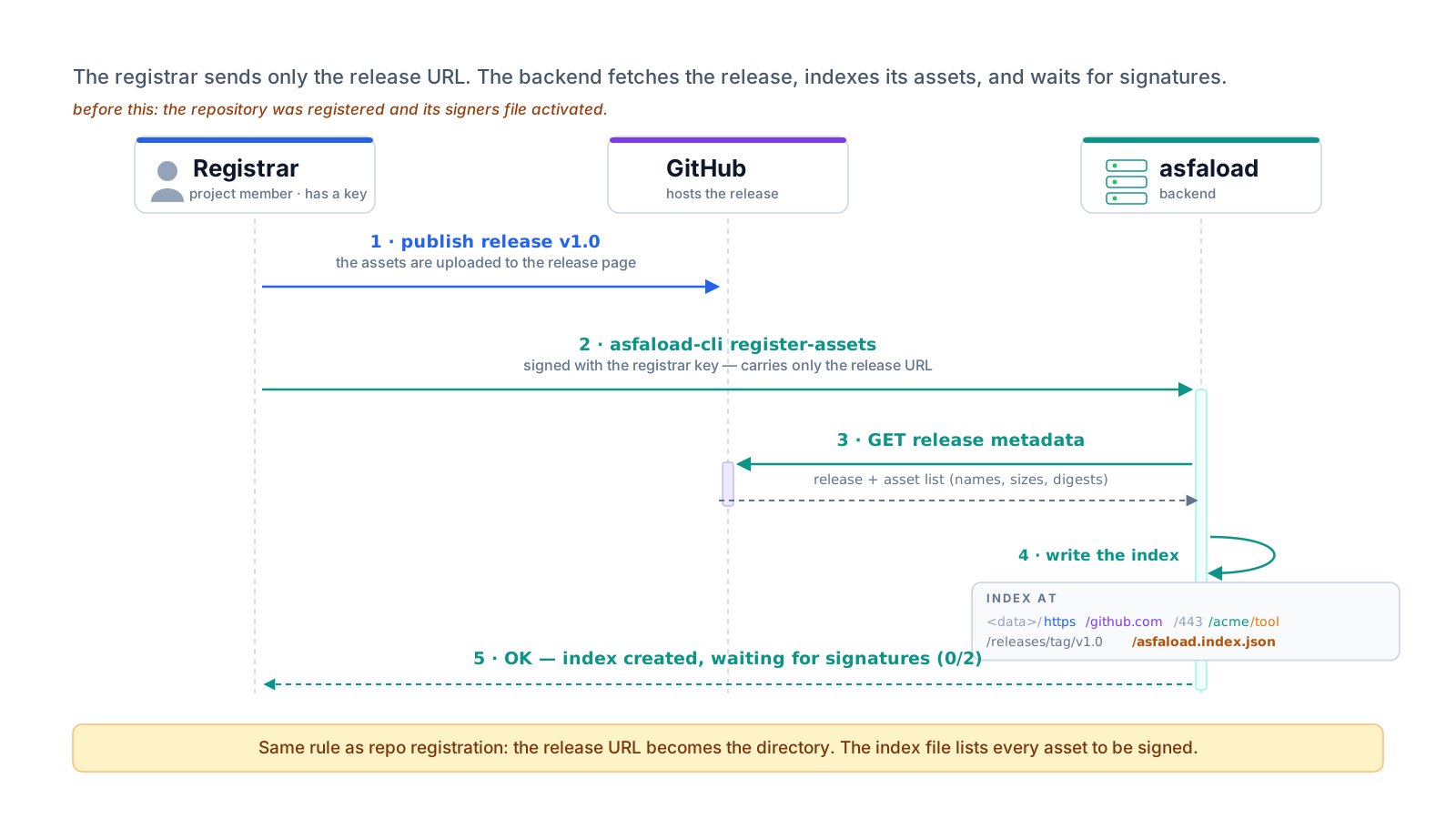
When the backend is notified of the release, it identifies the publishing repo
and its corresponding path on disk. It then retrieves the digests of the
artefacts published in the release and aggregates them in a so-called index file.
This index file indicates for each release artifact its digest and the source
of this digest (in the case of a Github release, it is the Github rest api
url).
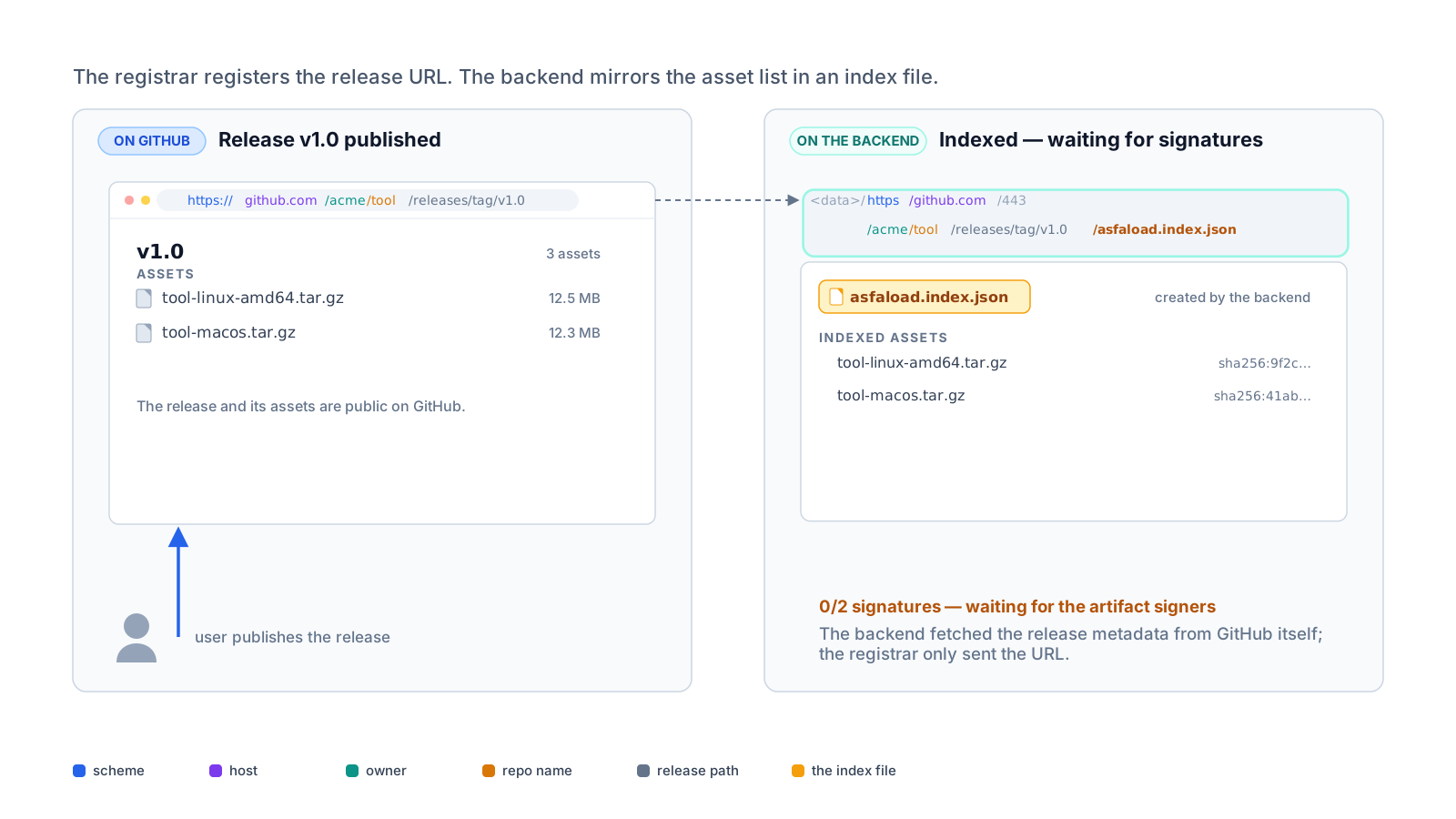
When the index is generated, but its signature is still in the pending state (it has the signatures.json.pending suffix), preventing its verification by downloaders.
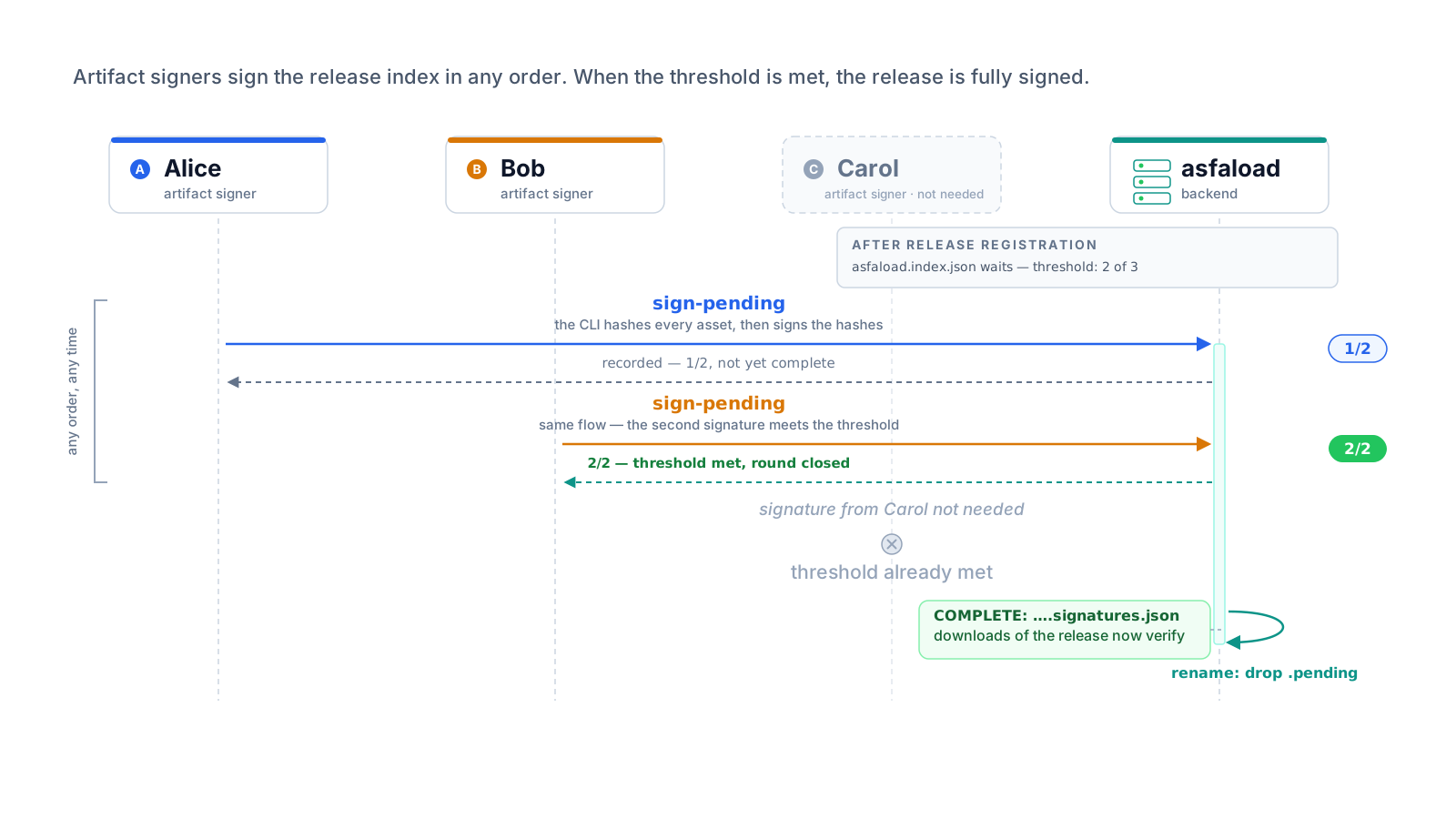
The signature of the index will transition to a complete state when the threshold of signature defined in the repo’s multi-signature
configuration is reached.
Release signature
The signature collection of the release can now start. The backend knows that
the release’s index has to be signed according to the repo’s multi-signature
config it has saved on disk. Users, identified by their respective keypairs,
can thus request to the backend all pending files to which they can append
their signature. This is done with the Asfaload client.
If we have a 2-of-3 configuration, two of the three existing signers (let’s
call them Alice, Bob, and Carol) have to sign the index for it to
become usable by downloaders of the release artifact.
The users see that the file
https/github.com/443/acme/tool/releases/tag/v0.1/asfaload.index.json, which
indeed corresponds to a release of their project.
They can use their client to check the validity of this index file. It will:
- retrieve the index from the backend
-
for each artifact in the index:
-
check that its digest source is indeed inside the release’s repo, in our example
acme/tool. A digest source from an other location, e.g. the repoattacker/toolis rejected with an error - retrieve the digest source
- compare the digest value in the digest source with the value in the index
-
check that its digest source is indeed inside the release’s repo, in our example
All these checks are done client-side, and don’t rely on the server.
The checks are done automatically before providing the signature of an index to the backend.
This ensures that a signature is registered on the backend only if the data could be validated as legitimate.
Modifying data in the release or the backend between release registration and
release signature raises an error. An attack would need to modify both before
the first signature is provided (otherwise the first signature would not be
valid anymore), but this is made even harder if you work with immutable releases.
Work is planned to close this attack window, with the client registering the
release submitting the index itself, together with its signature.
When the threshold of signature has been reached, the signature of the index transitions to a complete state (its pending marker is dropped) and can be used by downloaders.
Downloading securely
To download securely, the client only needs the download url of the artifact.
We will base our analysis on the download of the artifact at https://github.com/acme/tool/releases/download/v0.9.0/bundle.zip.
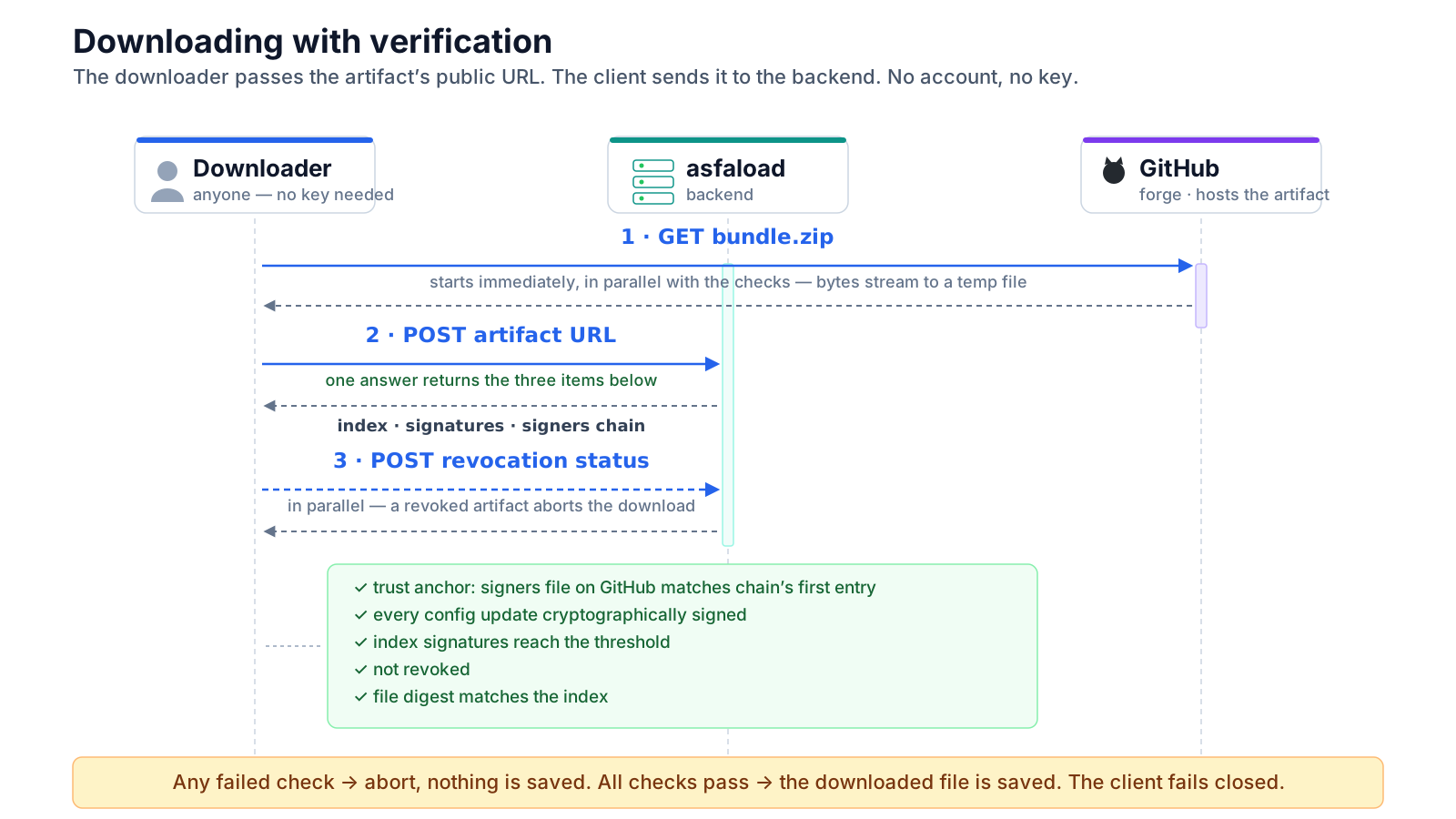
This is what the client does based on this download url:
- the download of the artifact is started immediately so verifications don’t slow down the download. Verifications from the next step occur in parallel.
- in parallel a revocation check is done (see below for details). Aborts everything if the artifact was revoked.
-
also in parallel, the verification starts. The client sends the artifact url to the backend, which answers with:
- the multi-signature configuration history (up to this artifact’s signature) found for this artifact. Signers updates occurring after this artifact was signed are not included.
-
the
indexand its signatures from the backend
- Verify the authenticity of the multisignature config. If there have been updates, verify that each update is cryptographically signed and legitimate (see below for details). Only the genesis configuration is checked against its original source (This is why we require the original multi-signature configuration to remain available). The multisignature configuration has in its metadata its retrieval url. The client checks the retrieval url corresponds to this project, and then proceeds to check the config at this retrieval url on the publishing platform matches the one on the backend. If this is the case, and as we suppose the project was not compromised at the time of registration, we conclude that the configuration is legitimate.
-
Verify that the signatures of the
indexreach the threshold of the multisignature config for this repo. If not, report an error. - If any check fails, the download is aborted and nothing is saved.
-
while downloading, compute its digest using the same algorithm found in the
indexfor this artifact. -
when download completes, compare computed digest with value found in
index. If they match, complete download, otherwise delete the data and report the error.
Multi-signature config update
A multi-signature configuration can be updated. this might be needed if members of the project changes, or if a signing key is lost or compromised.
This is done by publishing the new config in the same repo. We advise to use a dedicated branch, for example asfaload_signers, where all configuration updates are published.
There are no constraints on the naming of the file, but using a convention might be useful for you to keep track of the update.
Once the new config is published, it needs to be registered with the Asfaload backend. It will download the config and make it the pending config, which will only be activated in replacement of the current config when all required signatures have been collected. The signatures required to update a multi-signature configuration are:
- the threshold of the admin or master groups of the current configuration have to be met
- the threshold of the admin or master groups of the new configuration have to be met
- all new signers present in the new configuration have to sign
These criteria ensure that an update that is applied is legitimate.
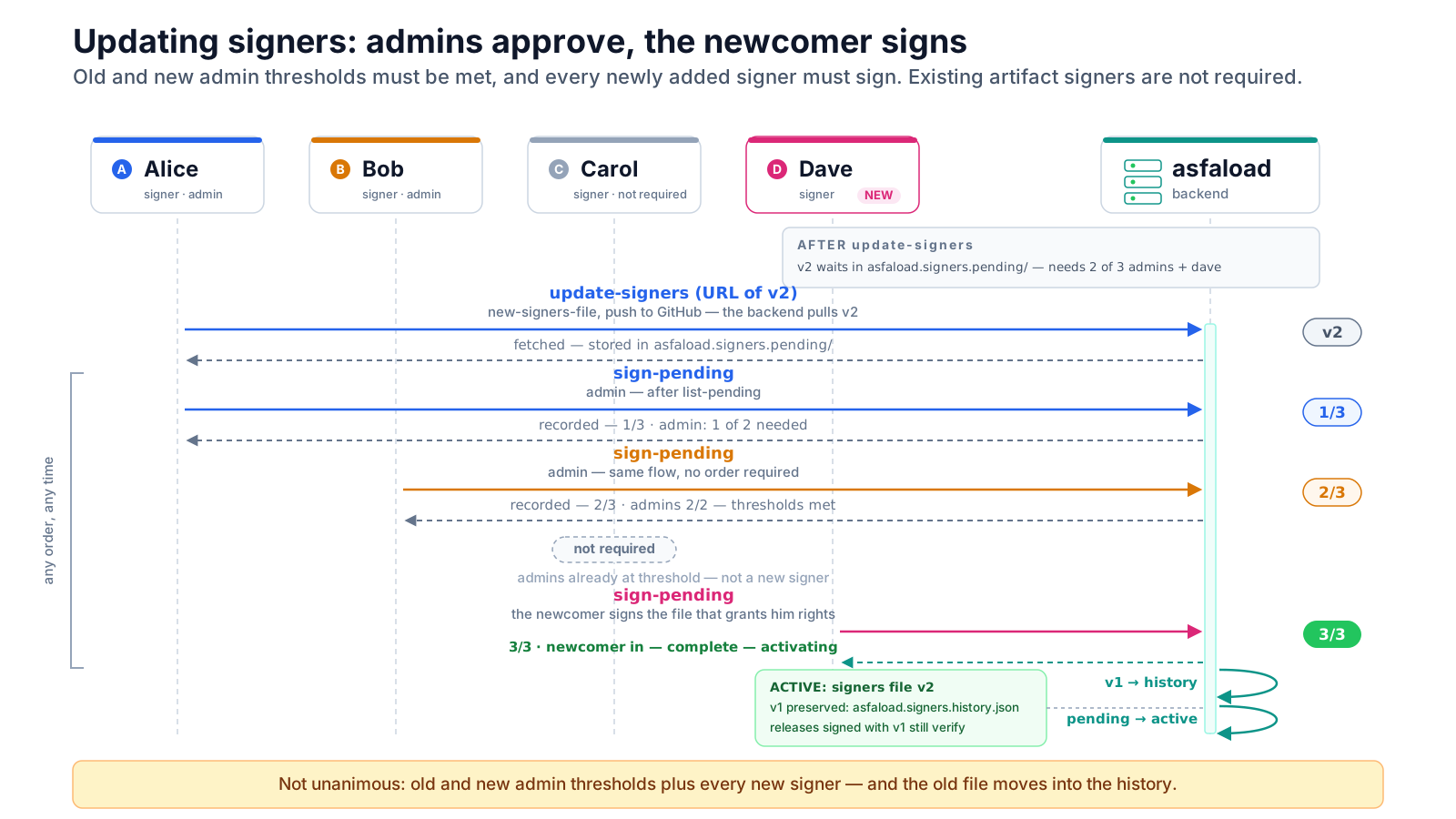
When the update is activated, the previous configuration is appended to the history, including its signatures. When a downloader checks the validity of an active multi-signature configuration, it will go through the whole history of updates to check each configuration update is legitimate, and then it will validate the initial config (the first entry in the history) against its source.
Revocation
Revoking a file is possible. Revoking a pending file prevents its signature completion, and revoking a signed file prevents its authenticated download.
A revoke can be initiated by and must reach the signature threshold of the revocation_keys group.
A revocation request is sent to the backend and targets a signed file. As in
the case of Github releases the signed file is the index file covering all
artifacts of the release, only the whole release can be revoked, not individual artifacts of the release.
The client sends a revocation request specifying the path of the signed file to be revoked. A revocation file is created as sibling of the file to be revoked. The submitter of the revocation provides:
- the path to the file being revoked
- a json document specifying the revocation
- the signature of the json document by the private key corresponding to the public key transmitted in the request
The submitter provides its signature of the revocation document. If the
threshold of the revocation_keys group is 1, the signature is complete and
the revocation is effective immediately. Otherwise other members of the group have to provide their signature.
When the revocation’s signature is complete, these actions take place:
- the pending revocation file has its pending suffix removed
- the revocation signatures file is renamed accordingly so it matches the now active revocation file
- a copy of the signers file at the time of revocation is taken
- the revoked file’s signatures file is renamed with a revoked suffix, making it unavailable for download authentication.
The client checks for a file’s revocation this way:
- ask for revocation data for the signed file. If the file is revoked it gets the revocation file, its signature, and the multisig configuration active at the revocation time.
- check the revocation reported target’s digest matches the effective digest of the file for which we check the revocation.
- check the revocation was initiated by an authorised key (member of the revocation group)
- validate the signers file is legitimate by checking the multisignature config history from the one returned by the backend (as described above).
- validate the signatures of the revocation file according to the multisig config
- if any check fails, the download is aborted and nothing is saved; only a confirmed absence of revocation lets the download continue
It can be argued that the download should only be aborted if the revocation validation is successful, however, the presence of a revocation that is incorrect is a problem in itself that is better reported than ignored.